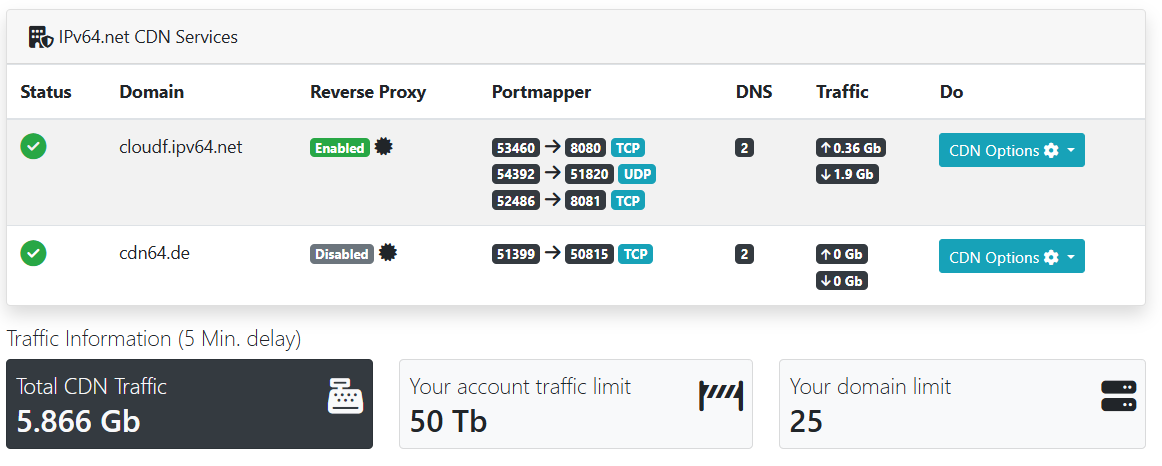
First, it is important to understand that for a CDN service, the provider must have the ability to adjust DNS entries for the respective domain. Since IPv64.net comes with its own DNS service, such automatic adjustments are possible without any issues. Common alternatives like Cloudflare also need to make changes to the DNS entries. IPv64.net does not differ in this regard.
If you want to use the IPv64.net CDN service, the first thing you need to do is activate the desired A and AAAA records in the CDN. This process removes your own IP addresses from the global DNS service and uses them only as backend connections. In the DNS that is available worldwide, the entries for this domain will then only show the DNS records of the IPv64 CDN servers. From that moment, all connection traffic is routed through the CDN servers.
Your DynDNS capability remains 100% intact. Active changes to the records are still updated at the correct location. IPv64.net continues to focus on maximum flexibility, so you are still able to change the IP addresses at any time via DynDNS / DynDNS2. These IP addresses are then adjusted in the CDN backend. This process happens completely without any impact on the end user.
The moment the DNS entries are changed to those of the CDN, all requests to the domain are sent via IPv64. This also allows for port mappings. For more information, please visit the Portmapper page.
The DNS failover is also integrated into the IPv64.net CDN. It is therefore still possible to trigger DNS failovers, and all changes are fully adopted by the CDN.
Reverting from the CDN is possible at any time. You just need to deactivate the DNS records in the CDN, and everything returns to normal.
 IPv64.net Content Delivery Network (CDN)